
All Virtual communications are carried out via email; there are no “notifications” or “alerts” sent via the system, so you don't need to log on regularly. We will email you directly whenever you need to take action. If you are required to comment, you will be given “commenter” access to enable you to add comments.
The commenting process is simple and is as follows:
When a manual is available for your review, you will be emailed directly confirming:
| The manual that is available for review | e.g. Fabric O&M 2.9 Floating Floors |
|---|---|
| The Contractor that has produced the O&M | TTL |
| The draft that is available for review | 1st draft |
You will need to log on to the Virtual system to review the O&M and navigate to the relevant folder, as detailed in the navigation section above.
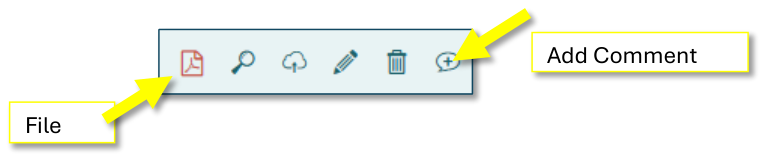
Open the document by clicking the “file” icon (it will open in a separate window). Add your comments to the document you’ve navigated to by clicking on the “+ speech bubble” icon at the far right-hand side of the page:
 Open image at full size ↗
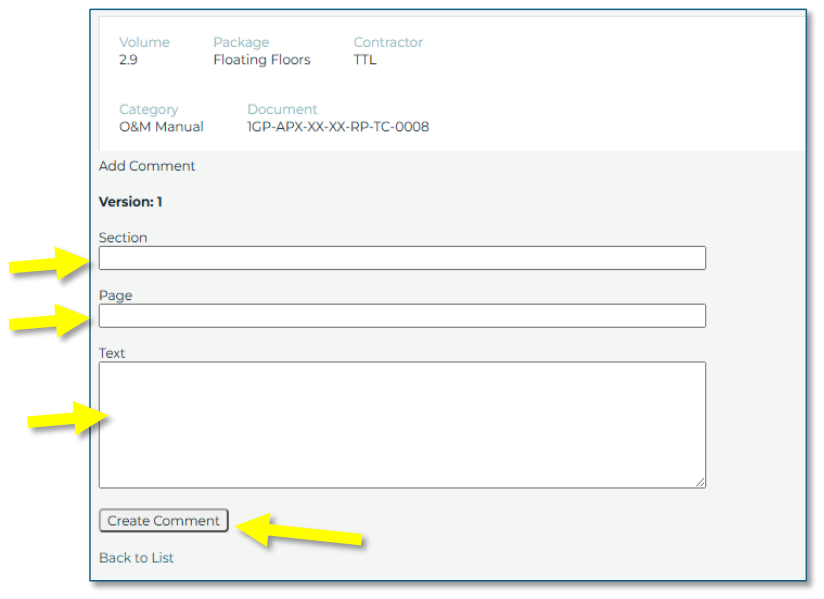
To add a comment, enter the section number, the page number and your comment – then click the create comment button, as shown below.
Identify the section your comment is against. Identify the relevant page number
Add your comment in the Text box, e.g. Paint thickness stated 40 microns; should be 80 microns.
 Open image at full size ↗
Click the “Create Comment” button.
Continue adding your comments until your review is complete. The last comment you MUST add should be:
“Comments complete – manual is status A, B or C” –
A being complete with no comments, B being complete with minor comments, C being incomplete – new draft required.
 Open image at full size ↗
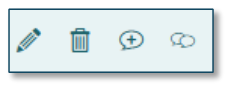
As you add your comments, you will see them appear in a list. Should you wish to edit a comment, click on the “pencil” icon. If you wish to delete a comment completely, click on the “trash can” icon. Posted comments are indicated with a “speech bubble” icon.
 Open image at full size ↗
Once you post your final “comments complete” comment, the website administrator will retrieve your comments for action. You will be notified if any further action is required on your part.